The GTD app that works everywhere
Simple enough to start in 30 seconds. Powerful enough to run your entire life. Free during early access.
Start free todayYour data stays yours. Export anytime. Full API access. No lock-in. Data Manifesto →
Sound familiar?
Every GTD app forces a trade‑off
Power or simplicity. Apple or everywhere. Features or sanity. Pick two — until now.
"I have adult ADHD. I have owned OmniFocus 1, 2 and now 3 Pro, hoping it will help organize my life. And I have basically never used it."
— Mac Power Users forum
Who it's for
One app that adapts to how you work
GTD practitioners who outgrew their app
You know GTD works. You need defer dates, sequential projects, perspectives, and weekly review. You shouldn't have to choose between power and the devices you actually use.
Power users stuck on one platform
Your task app works great — on your Mac. But your work laptop runs Windows, your partner uses Android, and the web version is stripped down. You need everything, everywhere — with areas to separate work, personal, and side projects.
Overwhelmed people who need less, not more
You've tried the complex apps. You've tried the simple ones. You need something that reduces cognitive load rather than adding to it — with shared lists for family, focus mode for clarity, and a tool that works for you.
"Leaving OmniFocus was probably the hardest technological decision I've ever made. I can't afford being in a vendor lock-in with Apple."
— OmniFocus power user, Hacker News
Features
Built for how GTD actually works
Every GTD feature you need — defer dates, sequential projects, perspectives, weekly review — in a calm interface that reveals complexity only when you're ready.
Defer dates that actually hide tasks
The #1 feature missing from cross-platform GTD apps. Set a start date, and the task disappears until it's actionable. Your lists only show what matters now.
"Without defer dates the clutter built up way too fast." — GTD user who tried switching apps

Sequential projects keep you focused
Only the next action shows. Complete it, the next appears. No scanning through tasks you can't act on yet. This is how GTD is supposed to feel.

Custom perspectives — fully editable
Other apps limit you to basic filters or lock perspective editing to desktop. SingleFocus gives you full control anywhere: combine tags, projects, dates, and status into custom saved views.

Weekly review — from anywhere
The weekly review is GTD’s most important habit, but most apps don’t support it at all — and those that do lock it to desktop. SingleFocus lets you walk through every project from any device.

Every GTD status built in. Tasks that aren't actionable right now stay out of your way — no guilt, no red warnings, no anxiety spirals.
Plot tasks by urgency and importance in a 2×2 grid. See what to do now, schedule, delegate, or drop — at a glance.

For when it's all too much
Focus mode: one task at a time
Long lists trigger overwhelm. Focus mode picks your top priority and shows just that — no long list, no scanning, no decision fatigue. Complete it, the next appears. That's it.
Combined with defer dates that hide future tasks and sequential projects that reveal only the next action, SingleFocus keeps your view radically minimal without hiding what matters.
"The #1 unmet need: a task manager that reduces cognitive load rather than adding to it." — User sentiment research across 6 major apps
Your most important task
No list. No clutter. Just the one thing that matters right now.
Try Focus mode — your most important task, one at a time
Deep Work · Needs attention · Feb 26
Complete this task to see the next one.
Smart features
It learns how you work
Most task apps are static checklists. SingleFocus quietly learns your patterns — when you're most productive, which tasks you finish first, where things stall — then uses that to help you make better decisions without adding complexity.
"What should I do next?"
Stop scanning your list and wondering where to start. SingleFocus picks your top priority based on what's due, what you've flagged, your peak productivity hours, and your completion patterns — then explains why in calm, clear language.
"A task manager that makes smart prioritization decisions without requiring manual configuration." — The #1 unmet need across 6 major apps
Review Q1 metrics with Sarah
Due today — tackling it now keeps your day on track.
Deep Work · #Quarterly Review · ~25 min
Personalized to your patterns. Updates as you complete tasks.
Productivity insights that actually help
See when you do your best work, which projects are stalling, and where your momentum is building — without obsessing over metrics. SingleFocus surfaces gentle insights when they're useful and stays quiet when they're not.
- Productivity rhythm — your peak hours and best days
- Project momentum — which projects need attention
- Drift detection — gentle nudges when things go off track
- Year in review — your annual productivity story
Your rhythm
You tend to do your best work between 9am–11am. Tuesdays are your most productive day.
This week
Strong week — 18 tasks completed, up from 12 last week.
5-day streak. Building momentum.
Gentle nudge
Your "Marketing" project hasn't had a completion in 12 days. Picking one task to move forward could help.
Energy lens
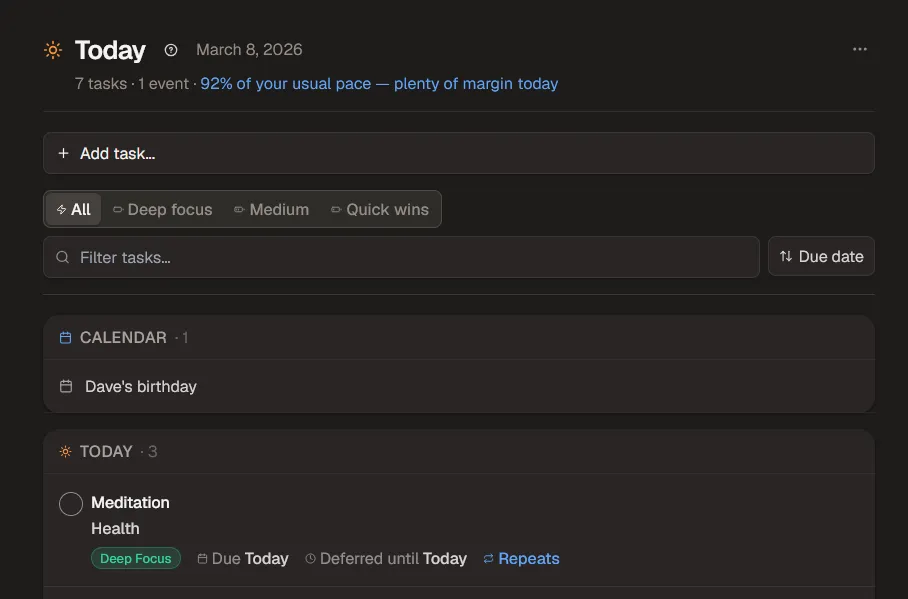
Map your tags to energy levels — deep focus, medium, quick wins. Filter your Today view by how much energy you have right now, not just what's due.
Smart defer suggestions
When you defer a task, SingleFocus suggests dates based on your workload, patterns, and when similar tasks worked out. One tap to accept.
Invisible rescue mode
When it detects overwhelm — too many tasks, too many overdue — it quietly simplifies your view. No guilt, no red warnings. Just calm guidance to get back on track.
Guided weekly review
A step-by-step review assistant that shows accomplishments, flags stalled projects, and surfaces repeatedly deferred tasks. Finish knowing nothing fell through the cracks.
Duration estimates
See how long similar tasks have taken you before. "~15 min" or "~1 hr" — so you can pick the right task for the time you have.
Browser extension
Press Alt+C from any tab to capture a task — without opening SingleFocus. NLP parsing, project matching, and tag auto-creation. Available for Chrome and Firefox.
Stay in the loop
Know what's on your plate before you open the app
Most task apps are passive — they wait for you to check in. SingleFocus reaches out gently, so nothing slips through the cracks even on your busiest days.
Morning digest — your day at a glance
A calm, daily email with today's tasks, upcoming deadlines, and a gentle nudge if anything carried over. Scan it over coffee — you'll know exactly where to start without opening the app.
"The first job of a task manager is to help you capture tasks quickly. The second is to tell you what actually matters today." — User sentiment across 6 major apps

Smart notifications
A push when something's due in 30 minutes. A reminder on your weekly review day. A gentle "welcome back" if you've been away for a few days. Quiet hours respected — no midnight pings. Carried-over tasks say "carried over," not "overdue."
Voice capture
Tap the mic and speak. Browser-powered speech recognition with AI-assisted task parsing — projects, tags, and dates extracted automatically. Works in English, Spanish, German, French, Chinese, and 7 more languages.
AI-powered
Talk to your tasks
Connect SingleFocus to ChatGPT, Claude, Cursor, or Windsurf via MCP. Ask what's on your plate, defer tasks, create new ones — all in natural language. No tab-switching, no context loss.

Natural conversation
"What's due this week?" "Defer the roadmap to Friday." "Create a task to review the Q1 metrics." Your AI assistant handles it all.
REST API
Full REST API with 34 endpoints. Automate with Zapier, Make, Apple Shortcuts, n8n, or build your own integrations.
Zero install setup
Paste the endpoint + your API token. That's it — no npm install, no local server.
Claude Desktop config
{
  "mcpServers": {
    "singlefocus": {
      "url": "https://app.singlefocus.co/api/mcp",
      "headers": {
        "Authorization": "Bearer sf_..."
      }
    }
  }
}
Comparison
How SingleFocus compares
| Feature | SingleFocus | OmniFocus | Todoist | TickTick | Nirvana |
|---|---|---|---|---|---|
| Defer / start dates | ✓ | ✓ | ✗ | ~1 | ✓ |
| Sequential projects | ✓ | ✓ | ✗ | ✗ | ✓ |
| Custom perspectives | ✓ | ~3 | ~4 | ~4 | ~4 |
| Cross-platform (web + desktop) | ✓ | ~5 | ✓ | ✓ | ✓ |
| ML-powered insights | ✓ | ~6 | ~7 | ~7 | ✗ |
| Free tier | ✓ | ✗ | ✓ | ✓ | ✓ |
✓ = Yes ✗ = No ~ = Partial
1 TickTick defer dates require an end date — not true start/defer dates.
2 Things "When" dates are Apple-only but genuinely hide tasks until the start date.
3 OmniFocus perspectives are view-only on the web — create/edit requires Apple native apps.
4 Filters or Smart Lists only — not full saved perspectives.
5 OmniFocus: Apple-only apps + stripped-down web (no search, review, or perspective editing). No Windows/Linux.
6 Apple Intelligence plug-ins (opt-in, macOS Tahoe/iOS 26) — not built-in ML analysis.
7 Basic productivity stats only — not ML-powered analysis.
Trust & security
Your data stays yours
Encrypted & secure
All data encrypted in transit (TLS) and at rest. Hosted on Supabase with row-level security — your tasks are only visible to you.
Export anytime
Download all your data as JSON whenever you want. No lock-in, no hostage situations. Your productivity system belongs to you.
Transparent pricing
No surprise price hikes — ever. Any pricing change will be announced at least 30 days in advance. Early access users lock in 50% off for life.
How it works
From sign-up to clear mind in 5 minutes
Dump your brain
Press N and type naturally. "Call dentist tomorrow #Health @phone" — projects, tags, and dates are parsed instantly. Under 3 seconds per task.
Let the system organize
Assign defer dates, mark projects sequential, set review cycles. Deferred tasks hide automatically. Sequential projects reveal only the next action. Your lists stay clean without daily maintenance.
Work from Today
Open the Today perspective each morning. It shows only what's actionable — flagged, due, or deferred-to-today. Use Focus mode to work one task at a time. No scanning, no guilt.
Take it everywhere
SingleFocus runs in any browser — Mac, Windows, Linux, iPad, Android, Chromebook. Install it as a PWA for an app-like experience with offline support and home screen access. No app store needed.
Always with you
Your pocket GTD system
Install SingleFocus as a PWA on any device — phone, tablet, laptop. Works behind corporate firewalls, on locked-down machines, at client sites. No install, no IT approval, no app store. Just open your browser.

PWA on every device
Add to your home screen for instant access, offline support, and push notifications. Feels native — no app store, no waiting for updates.
In their own words
Why people are looking for something new
"Thousands of people having to run two separate to-do list manager systems is what marketing experts call an important but unmet customer need."
— mwooten777, Omni Group Forums (most-liked post)
"I just left OmniFocus because I realized I'm better off with something that can run on Windows as well as iOS. If they ever release a web client, I might give it another go."
— User on MacRumors Forums
"The pain of running 2 separate GTD universes was greater than not having a desktop client. Todoist was fine, but without defer dates the clutter built up way too fast."
— psidnell, Omni Group Forums
"Most people want a task management solution they can use anytime, anywhere. Unfortunately OmniFocus doesn't provide that unless you are using iOS or Mac devices."
— Mike Vardy, Productivityist
On the roadmap
Coming soon
Early access users shape what gets built next. Your feedback drives the roadmap.
Pricing
Free while it's being built. Fair when it launches.
SingleFocus is 100% free during early access because your feedback shapes the product. Every feature request, bug report, and workflow insight makes it better for everyone. When paid plans launch at $8/month ($72/year), early access users lock in $36/year for life. No surprise price hikes — any change will be announced at least 30 days in advance.
$8/month ($72/year) → $36/year for life for early access users
- ✓All GTD features — defer dates, sequentials, perspectives, review
- ✓Unlimited tasks, projects, and tags
- ✓Works on every device and browser
- ✓PWA with offline support
- ✓Real-time sync powered by Supabase
- ✓Smart insights — focus pick, rhythm, energy lens, rescue mode
- ✓Browser extension for Chrome & Firefox
- ✓REST API + AI assistants (MCP) + compatible with Zapier, Make, n8n
- ✓Shared lists, calendar integration (Google, Outlook, any iCal), notifications
- ✓Export your data anytime (JSON, CSV, Markdown) — no lock-in
- ✓Lock in $36/year for life when paid plans launch
- ✓Lifetime deal option (~$199) coming at launch
FAQ
Common questions
What makes SingleFocus different from OmniFocus?
How is SingleFocus better than Todoist for GTD?
Is SingleFocus free?
What platforms does SingleFocus work on?
How does the AI assistant integration work?
Can I use SingleFocus with Zapier or Make?
What are the smart features? How does it "learn"?
Is there a browser extension?
Can I export my data?
Sleep better knowing nothing will slip
The calm of a trusted system — on every device you own. Built by one person who uses it daily. Your data is in Postgres with a full REST API — you can always leave.
Start free todayWorks in any browser. Install as a PWA for offline access.